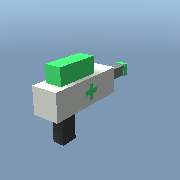
Healing gun
Gear · by Brixborg
Heals your teammates instead of hurting anyone: 8 health a shot. Hold the button on a friend; R refills the tank.
Use it in your games: in the studio, open View > Archive, go to the Gear shelf and pick "Healing gun".
To wear it, get it in the Shop: 50 Brixrods in the Shop
The script
-- Copyright (c) 2026 Brixborg Owners. All rights reserved. See LICENSE.txt.
-- THE GUN, ON YOUR SCREEN: the mouse and keys, the crosshair and the ammo.
-- (A LocalScript inside the gun. The GunServer Script beside it works out
-- where each shot goes and who it hurts.)
--
--   Click            fire (hold it down, for an automatic gun)
--   R                reload
--
-- The numbers are in the gun's Settings folder:
--   Ammo             shots before you must reload
--   ReloadTime       seconds a reload takes
--   FireDelay        seconds between shots
--   Automatic        true = keeps firing while the button is held

local tool = script.Parent
local settings = tool:WaitForChild("Settings")
local fireEvent = tool:WaitForChild("Fire")
local player = game.Players.LocalPlayer

local function setting(name) return settings[name].Value end

-- The Brixborg look.
local GREEN = Color3.fromRGB(70, 235, 120)
local BLACK = Color3.new(0.03, 0.05, 0.04)
local WHITE = Color3.new(1, 1, 1)
local RED = Color3.fromRGB(240, 70, 60)

local CROSSHAIR_GAP = 6      -- pixels from the middle to each line
local CROSSHAIR_LENGTH = 8   -- how long each line is
local KICK = 3               -- how far the lines jump out with each shot (pixels)

local mouse = nil
local screen, crosshair, lines, ammoText, nameText, marker = nil, nil, {}, nil, nil, nil
local ammo = setting("Ammo")
local reloading = false
local firing = false
local lastShot = -10
local kick = 0
local connections = {}

local function showAmmo()
  if not ammoText then return end
  if reloading then
    ammoText.Text = "RELOADING"
    ammoText.TextColor3 = RED
  else
    ammoText.Text = ammo .. " / " .. setting("Ammo")
    ammoText.TextColor3 = ammo > 0 and GREEN or RED
  end
end

local function placeCrosshair()
  if not crosshair or not mouse then return end
  crosshair.Position = UDim2.new(0, mouse.X, 0, mouse.Y)
  local gap = CROSSHAIR_GAP + kick
  lines[1].Position = UDim2.new(0, -1, 0, -gap - CROSSHAIR_LENGTH)    -- up
  lines[2].Position = UDim2.new(0, -1, 0, gap)                        -- down
  lines[3].Position = UDim2.new(0, -gap - CROSSHAIR_LENGTH, 0, -1)    -- left
  lines[4].Position = UDim2.new(0, gap, 0, -1)                        -- right
end

local function buildScreen()
  screen = Instance.new("ScreenGui")
  screen.Name = "GunScreen"
  crosshair = Instance.new("Frame", screen)
  crosshair.BackgroundTransparency = 1
  crosshair.Size = UDim2.new(0, 0, 0, 0)
  lines = {}
  for i = 1, 4 do
    local line = Instance.new("Frame", crosshair)
    line.BorderSizePixel = 0
    line.BackgroundColor3 = GREEN
    line.Size = i <= 2 and UDim2.new(0, 2, 0, CROSSHAIR_LENGTH) or UDim2.new(0, CROSSHAIR_LENGTH, 0, 2)
    lines[i] = line
  end
  -- The hit marker: a small square in the middle, shown for a moment on a hit.
  marker = Instance.new("Frame", crosshair)
  marker.BorderSizePixel = 0
  marker.Position = UDim2.new(0, -3, 0, -3)
  marker.Size = UDim2.new(0, 6, 0, 6)
  marker.Visible = false

  local panel = Instance.new("Frame", screen)
  panel.Position = UDim2.new(1, -220, 1, -84)
  panel.Size = UDim2.new(0, 200, 0, 64)
  panel.BackgroundColor3 = BLACK
  panel.BackgroundTransparency = 0.2
  panel.BorderColor3 = GREEN
  nameText = Instance.new("TextLabel", panel)
  nameText.BackgroundTransparency = 1
  nameText.Position = UDim2.new(0, 10, 0, 4)
  nameText.Size = UDim2.new(1, -20, 0, 20)
  nameText.Font = Enum.Font.SourceSansBold
  nameText.FontSize = Enum.FontSize.Size14
  nameText.TextColor3 = WHITE
  nameText.TextXAlignment = Enum.TextXAlignment.Left
  nameText.Text = string.upper(tool.Name) .. "   R: reload"
  ammoText = Instance.new("TextLabel", panel)
  ammoText.BackgroundTransparency = 1
  ammoText.Position = UDim2.new(0, 10, 0, 26)
  ammoText.Size = UDim2.new(1, -20, 0, 32)
  ammoText.Font = Enum.Font.SourceSansBold
  ammoText.FontSize = Enum.FontSize.Size24
  ammoText.TextXAlignment = Enum.TextXAlignment.Left
  screen.Parent = player:FindFirstChild("PlayerGui")
  showAmmo()
  placeCrosshair()
end

local function reload()
  if reloading or ammo == setting("Ammo") then return end
  reloading = true
  showAmmo()
  local sound = Instance.new("Sound", tool:FindFirstChild("Handle"))
  sound.SoundId = "brixborg:reload"
  sound.Volume = 0.5
  sound:Play()
  wait(setting("ReloadTime"))
  ammo = setting("Ammo")
  reloading = false
  showAmmo()
  sound:Destroy()
end

local function shoot()
  if reloading or not mouse then return end
  if time() - lastShot < setting("FireDelay") then return end
  if ammo <= 0 then
    spawn(reload)
    return
  end
  local humanoid = player.Character and player.Character:FindFirstChild("Humanoid")
  if not humanoid or humanoid.Health <= 0 then return end
  lastShot = time()
  ammo = ammo - 1
  showAmmo()
  fireEvent:FireServer(mouse.Hit.p)
  kick = math.min(kick + KICK, KICK * 4)
  placeCrosshair()
  if ammo == 0 then spawn(reload) end
end

-- The server says the shot hit someone: flash the marker.
fireEvent.OnClientEvent:connect(function(what)
  if not marker then return end
  marker.BackgroundColor3 = what == "headshot" and RED or what == "healed" and GREEN or WHITE
  marker.Visible = true
  wait(0.12)
  if marker then marker.Visible = false end
end)

tool.Equipped:connect(function(theMouse)
  mouse = theMouse or player:GetMouse()
  buildScreen()
  table.insert(connections, mouse.Move:connect(placeCrosshair))
  table.insert(connections, mouse.KeyDown:connect(function(key)
    if key == "r" then reload() end
  end))
end)

tool.Unequipped:connect(function()
  firing = false
  for _, c in ipairs(connections) do c:disconnect() end
  connections = {}
  if screen then screen:Destroy() end
  screen, crosshair, ammoText, marker = nil, nil, nil, nil
end)

tool.Activated:connect(function()
  firing = true
  if not setting("Automatic") then
    shoot()
    return
  end
  while firing and tool.Parent == player.Character do
    shoot()
    wait()
  end
end)

tool.Deactivated:connect(function()
  firing = false
end)

-- The crosshair settles back in after the gun stops kicking.
while true do
  wait(0.05)
  if kick > 0 then
    kick = math.max(0, kick - 1.5)
    placeCrosshair()
  end
end